brake Ram 1500 2013 Get to Know Guide
[x] Cancel search | Manufacturer: RAM, Model Year: 2013, Model line: 1500, Model: Ram 1500 2013Pages: 196, PDF Size: 9.66 MB
Page 3 of 196
INTRODUCTION/WELCOME
WELCOME FROM CHRYSLER
GROUP LLC.................. 3
CONTROLS AT A GLANCE
DRIVER COCKPIT .............. 6
INSTRUMENT CLUSTER .......... 8
GETTING STARTED
KEYFOB ................... 10
KEYLESS ENTER-N-GO™ ......... 11
REMOTE START .............. 13
THEFT ALARM ............... 13
SEATBELT .................. 13
SUPPLEMENTAL RESTRAINT
SYSTEM (SRS) — AIR BAGS ....... 14
CHILD RESTRAINTS ............ 15
FRONT SEATS ................ 20
HEATED/VENTILATED SEATS ....... 22
HEATED STEERING WHEEL ........ 23
TILT STEERING COLUMN ......... 24
OPERATING YOUR VEHICLE
ENGINE BREAK-IN
RECOMMENDATIONS........... 25
TURN SIGNALS/WIPER/WASHER/
HIGH BEAMS LEVER ............ 26
HEADLIGHT SWITCH ............ 27
SPEED CONTROL .............. 28
EIGHT–SPEED AUTOMATIC
TRANSMISSION — IF EQUIPPED .... 29
ELECTRONIC RANGE SELECT (ERS)
OPERATION ................. 30
AIR SUSPENSION SYSTEM ........ 32
MANUAL CLIMATE CONTROLS
WITHOUT TOUCH-SCREEN ........ 34
MANUAL CLIMATE CONTROLS
WITH TOUCH-SCREEN ........... 35
AUTOMATIC CLIMATE CONTROLS
WITH TOUCH-SCREEN ........... 36
PARKSENSE
®REAR PARK ASSIST . . . 37
PARKVIEW®REAR BACK-UP
CAMERA ................... 38
TIRE PRESSURE MONITOR SYSTEM
(TPMS) – 2500 MODELS ONLY ...... 38
POWER SLIDING REAR WINDOW .... 39
POWER SUNROOF ............. 40
WIND BUFFETING ............. 41
ELECTRONICS
YOUR VEHICLE'S SOUND SYSTEM . . . 42
IDENTIFYING YOUR RADIO ........ 44
Uconnect
®Access (AVAILABLE ON
Uconnect®8.4A AND Uconnect®8.4AN)
(IF EQUIPPED) ................ 45
Uconnect
®3.0 ................ 54
Uconnect®5.0 ................ 56 Uconnect
®8.4A ............... 62
Uconnect®8.4AN .............. 79
STEERING WHEEL AUDIO
CONTROLS .................. 97
ELECTRONIC VEHICLE
INFORMATION CENTER (EVIC) ..... 98
PROGRAMMABLE FEATURES ....... 98
UNIVERSAL GARAGE DOOR OPENER
(HomeLink
®) ................ 101
POWER INVERTER ............ 103
POWER OUTLETS ............ 104
OFF-ROAD CAPABILITIES
FOUR WHEEL DRIVE OPERATION . . . 105
UTILITY
TONNEAU COVER............. 108
EASY-OFF TAILGATE ........... 108
PICKUP BOX ................ 109
RAMBOX
®.................. 110
TOWING & PAYLOAD ........... 114
TOW/HAUL MODE ............ 116
INTEGRATED TRAILER BRAKE
MODULE .................. 116
RECREATIONAL TOWING
(BEHIND MOTORHOME, ETC.) ..... 118
DIESEL
DIESEL ENGINE BREAK-IN
RECOMMENDATIONS........... 120
DIESEL ENGINE STARTING
PROCEDURES ............... 120
DIESEL EXHAUST BRAKE
(ENGINE BRAKING) ........... 121
IDLE-UP FEATURE (AUTOMATIC
TRANSMISSION ONLY) ......... 122
ENGINE MOUNTED FUEL
FILTER/WATER SEPARATOR ....... 123
UNDERBODY MOUNTED FUEL
FILTER/WATER SEPARATOR ....... 124
ADDING FUEL – DIESEL ENGINE
ONLY ..................... 125
EXHAUST REGENERATION ....... 125
COOL-DOWN IDLE CHART ........ 127
DIESEL EXHAUST FLUID ........ 127
WHAT TO DO IN EMERGENCIES
ROADSIDE ASSISTANCE......... 130
INSTRUMENT CLUSTER WARNING
LIGHTS ................... 130
IF YOUR ENGINE OVERHEATS ..... 134
JACKING AND TIRE CHANGING .... 135
JUMP-STARTING ............. 148
EMERGENCY TOW HOOKS ....... 150
SHIFT LEVER OVERRIDE ........ 150
TOWING A DISABLED VEHICLE .... 153
FREEING A STUCK VEHICLE ...... 154
EVENT DATA RECORDER (EDR) .... 155
TABLE OF CONTENTS
Page 6 of 196

VEHICLES SOLD IN CANADA
With respect to any vehicles sold in Canada, the name Chrysler Group LLC shall be
deemed to be deleted and the name Chrysler Canada Inc. used in substitution.
WARNING!
• Pedals that cannot move freely can cause loss of vehicle control and increasethe risk of serious personal injury.
• Always make sure that objects cannot fall into the driver foot well while the
vehicle is moving. Objects can become trapped under the brake pedal and
accelerator pedal causing a loss of vehicle control.
• Failure to properly follow floor mat installation or mounting can cause inter-
ference with the brake pedal and accelerator pedal operation causing loss of
control of the vehicle.
• Never use the ‘PARK’ position as a substitute for the parking brake. Always apply the parking brake fully when parked to guard against vehicle movement
and possible injury or damage.
• Refer to your Owner's Manual on the DVD for further details.
INTRODUCTION/WELCOME
4
Page 9 of 196

A. Headlight Switch pg. 27
B. Turn Signal/Wiper/Washer/HighBeams Lever pg. 26
C. Electronic Vehicle Information Center (EVIC) Controls pg. 98
D. Electronic Vehicle Information Center (EVIC) Display pg. 9
E. Instrument Cluster pg. 8
F. Four Wheel Drive Operation pg. 105
G. Identify Your Audio System pg. 42
H. Audio System Hard Controls pg. 42
I. Power Inverter Outlet pg. 103
J. Manual Climate Controls pg. 34 K. Switch Panel
• Diesel Exhaust Brake
• Tow/Haul pg. 116
• Electronic Stability Control pg. 130
• Air Suspension System
• ParkSense
®Rear Park Assist pg. 37
• Tire Pressure Monitoring System (TPMS) pg. 130
• Front Heated Seats pg. 22
• Front Ventilated Seats pg. 22
• Heated Steering Wheel pg. 23
• Integrated Trailer Brake Module pg. 116
• Engine Stop Start L. Shifter
M. Keyless Engine Starting/Stopping
pg. 12
N. Electronic Speed Control pg. 28
O. Hood Release (below steering wheel at base of instrument panel) pg. 156
P. Parking Brake Release
Q. Power Mirrors
R. Power Windows
S. Power Door Locks
CONTROLS AT A GLANCE
7
Page 10 of 196
INSTRUMENT CLUSTER
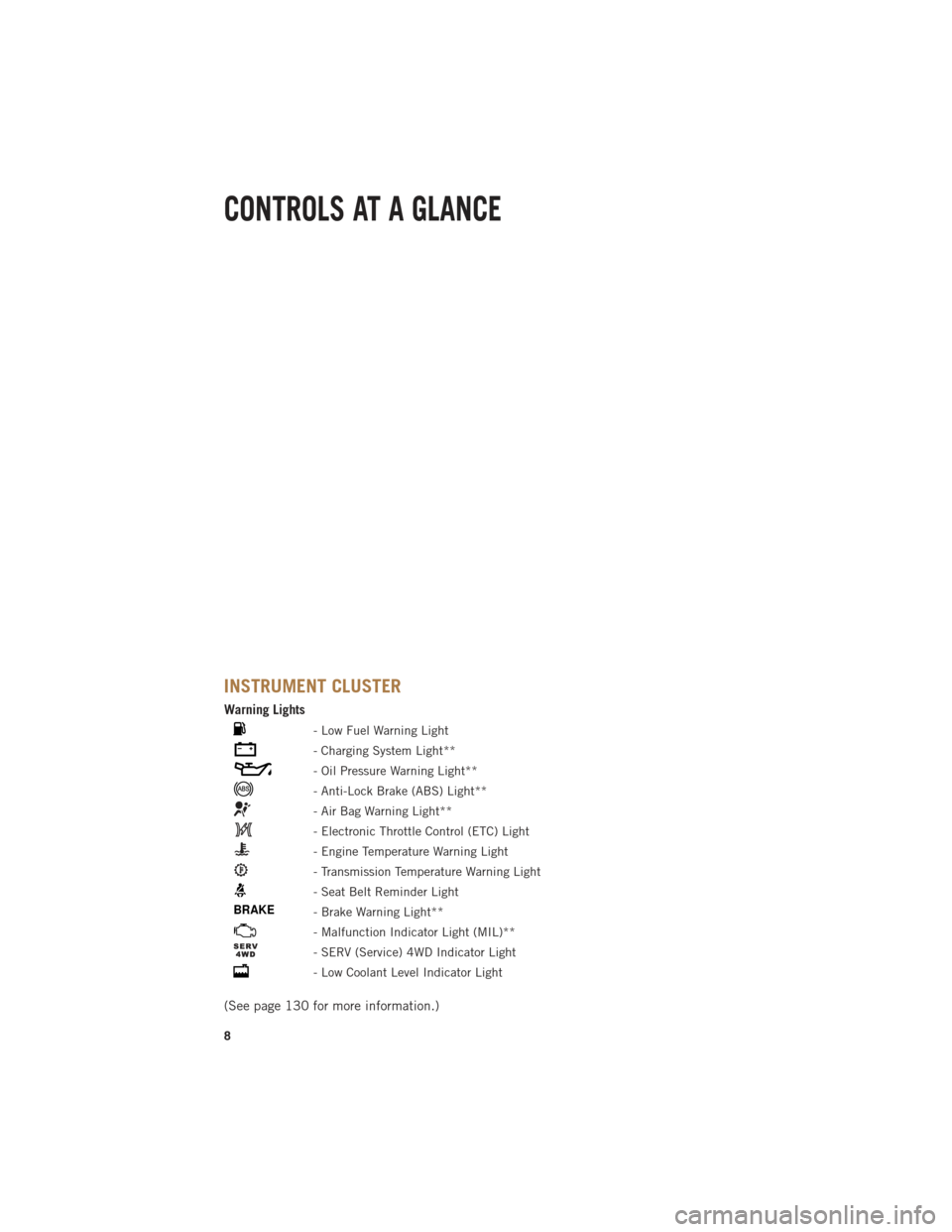
Warning Lights
- Low Fuel Warning Light
- Charging System Light**
- Oil Pressure Warning Light**
- Anti-Lock Brake (ABS) Light**
- Air Bag Warning Light**
- Electronic Throttle Control (ETC) Light
- Engine Temperature Warning Light
- Transmission Temperature Warning Light
- Seat Belt Reminder Light
BRAKE- Brake Warning Light**
- Malfunction Indicator Light (MIL)**
- SERV (Service) 4WD Indicator Light
- Low Coolant Level Indicator Light
(See page 130 for more information.)
CONTROLS AT A GLANCE
8
Page 12 of 196
KEY FOB
Locking And Unlocking The Doors
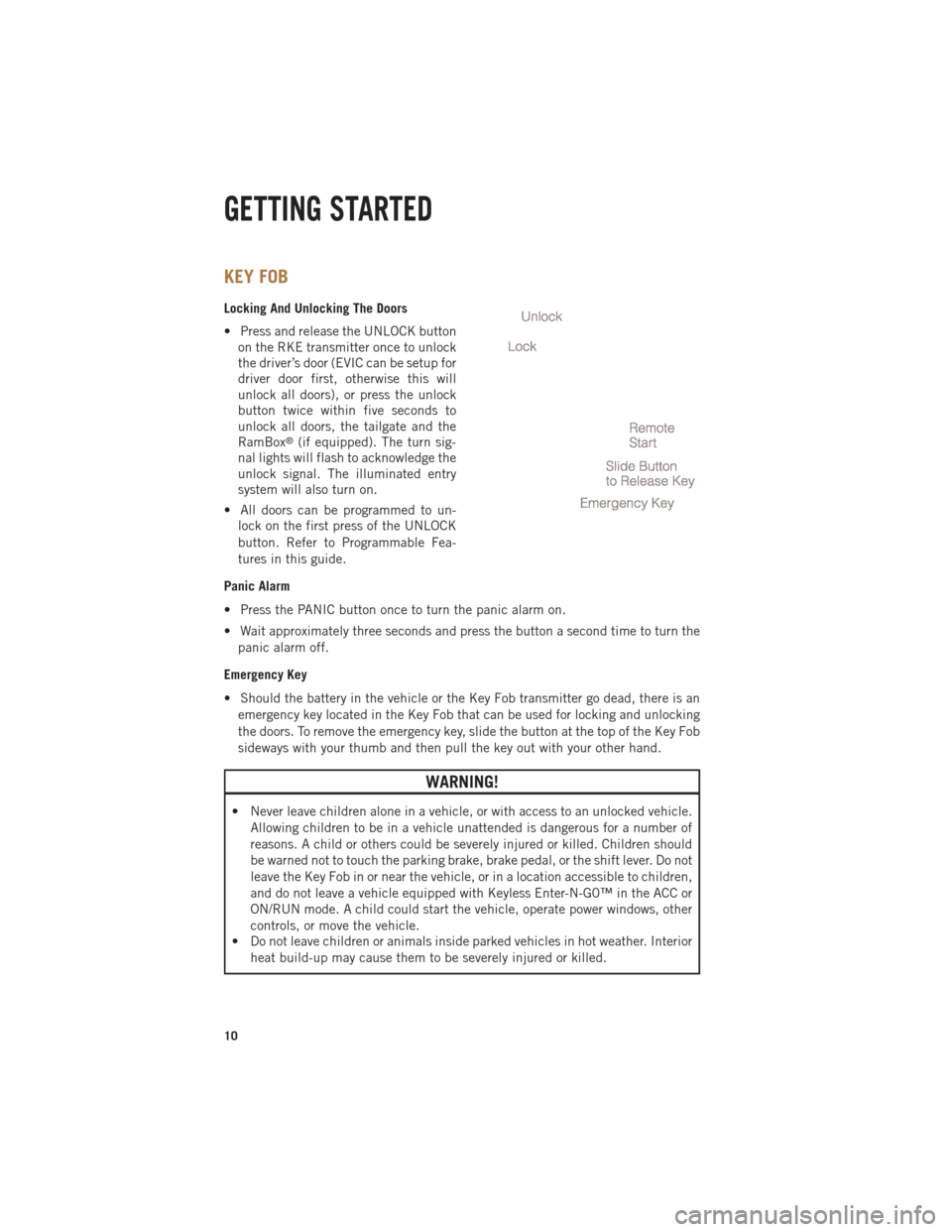
• Press and release the UNLOCK buttonon the RKE transmitter once to unlock
the driver’s door (EVIC can be setup for
driver door first, otherwise this will
unlock all doors), or press the unlock
button twice within five seconds to
unlock all doors, the tailgate and the
RamBox
®(if equipped). The turn sig-
nal lights will flash to acknowledge the
unlock signal. The illuminated entry
system will also turn on.
• All doors can be programmed to un- lock on the first press of the UNLOCK
button. Refer to Programmable Fea-
tures in this guide.
Panic Alarm
• Press the PANIC button once to turn the panic alarm on.
• Wait approximately three seconds and press the button a second time to turn the panic alarm off.
Emergency Key
• Should the battery in the vehicle or the Key Fob transmitter go dead, there is an emergency key located in the Key Fob that can be used for locking and unlocking
the doors. To remove the emergency key, slide the button at the top of the Key Fob
sideways with your thumb and then pull the key out with your other hand.
WARNING!
• Never leave children alone in a vehicle, or with access to an unlocked vehicle. Allowing children to be in a vehicle unattended is dangerous for a number of
reasons. A child or others could be severely injured or killed. Children should
be warned not to touch the parking brake, brake pedal, or the shift lever. Do not
leave the Key Fob in or near the vehicle, or in a location accessible to children,
and do not leave a vehicle equipped with Keyless Enter-N-G0™ in the ACC or
ON/RUN mode. A child could start the vehicle, operate power windows, other
controls, or move the vehicle.
• Do not leave children or animals inside parked vehicles in hot weather. Interior
heat build-up may cause them to be severely injured or killed.
GETTING STARTED
10
Page 14 of 196

Engine Starting/Stopping
Starting
• With a valid Keyless Enter-N-Go™ KeyFob inside the vehicle.
• Place the shift lever in PARK or NEU- TRAL.
•
While pressing the brake pedal, press
the ENGINE START/STOP button once.
If the engine fails to start, the starter will
disengage automatically after 10 sec-
onds.
•To stop the cranking of the engine prior
to the engine starting, press the button again.
NOTE:
In case the ignition switch does not change with the push of a button, the RKE
transmitter (Key Fob) may have a low or dead battery. In this situation a back up
method can be used to operate the ignition switch. Put the nose side of the Key Fob
(side opposite of the Emergency Key) against the ENGINE START/STOP button and
push to operate the ignition switch.
Stopping
• Bring the vehicle to a complete stop.
• Place the shift lever in the PARK position.
• Press the ENGINE START/STOP button once. The ignition switch will return to the OFF position.
NOTE:
If the shift lever is not in PARK and the vehicle is in motion, the ENGINE START/STOP button
must be held for two seconds with the vehicle speed above 5 mph (8 km/h) before the
engine will shut off.
GETTING STARTED
12
Page 23 of 196

Memory Seat
• The memory seat feature allows you tosave the driver's seat position (exclud-
ing lumbar position), driver's outside
mirror position, adjustable brake and
accelerator pedals, Automatic Tem-
perature Control (ATC) temperature
setting and radio station preset set-
tings. The driver's memory buttons are
located on the outboard side of the
driver's seat cushion.
• Adjust all memory profile settings, press the middle button S (SET), then
press 1 or 2 within five seconds.
• To program a Key Fob to the memory position, place the ignition switch in the LOCK position and remove the Key Fob, press and release the LOCK button on the
Key Fob to be programmed within 5 seconds of pressing button 1 or 2.
• Press 1 or 2 to recall the saved positions, or press UNLOCK on the programmed Key Fob.
• Refer to the Owner's Manual on the DVD for further details.
Manual Seats
Forward/Rearward
• Lift up on the adjusting bar located at the front of the seat near the floor and
release it when the seat is at the de-
sired position. Then, using body pres-
sure, move forward and backward on
the seat to be sure that the seat adjust-
ers have latched.
Recliner
• Lift the recliner lever located on the
outboard side of the seat, lean back
and release at the desired position.
CAUTION!
Do not place any article under a power seat or impede its ability to move as it may
cause damage to the seat controls. Seat travel may become limited if movement
is stopped by an obstruction in the seat’s path.
GETTING STARTED
21
Page 26 of 196

TILT STEERING COLUMN
• The tilt lever is located on the steeringcolumn below the turn signal lever.
• To tilt the column, simply pull the tilt lever rearward toward you and then
move the steering wheel upward or
downward as desired.
• Release the tilt lever to lock the steer- ing wheel into position.
ADJUSTABLE PEDALS
• Press the switch located on the left side of the steering column forward to
move the brake and accelerator pedals
away from the driver and press the
switch rearward to move the pedals
closer to the driver.
NOTE:
The pedals cannot be adjusted when the vehicle is in REVERSE or when the
Electronic Speed Control is set.
CAUTION!
Do not place any article under the adjustable pedals or impede its ability to move,
as it may cause damage to the pedal controls. Pedal travel may become limited if
movement is stopped by an obstruction in the adjustable pedal's path.
WARNING!
• Tilting the steering column while the vehicle is moving is dangerous. Without a stable steering column, you could lose control of the vehicle and have a
collision. Adjust the column only while the vehicle is stopped. Be sure it is
locked before driving.
• Do not adjust the pedals while the vehicle is moving. You could lose control and
have a collision. Always adjust the pedals while the vehicle is parked.
GETTING STARTED
24
Page 31 of 196

Resume
• To resume a previously selected set speed in memory, push the RESUME/ACCELswitch and release.
Cancel
• Push the CANCEL switch or apply the brakes to cancel the set speed and maintain the set speed memory.
• Push the ON/OFF switch to turn the system off and erase the set speed memory.
WARNING!
• Leaving the Electronic Speed Control system on when not in use is dangerous. You could accidentally set the system or cause it to go faster than you want.
You could lose control and have a collision. Always leave the Electronic Speed
Control system off when you are not using it.
• Electronic Speed Control can be dangerous where the system cannot maintain a constant speed. Your vehicle could go too fast for the conditions, and you
could lose control. A collision could be the result. Do not use Electronic Speed
Control in heavy traffic or on roads that are winding, icy, snow-covered or
slippery.
EIGHT–SPEED AUTOMATIC TRANSMISSION — IF EQUIPPED
• Your vehicle is equipped with a stateof the art, fuel efficient eight-speed
transmission. The electronic Transmis-
sion Shifter is located on the instru-
ment panel. The transmission gear
(PRND) is displayed both above the
shifter control and in the Electronic
Vehicle Information Center (EVIC).
• To select a gear range, simply rotate the shifter control.
NOTE:
You must press the brake pedal to shift
the transmission out of PARK or from
NEUTRAL into DRIVE or REVERSE.
• To shift past multiple gear ranges at once (such as Park to Drive), simply rotate the switch to the appropriate detent.
• Select the DRIVE range for normal driving.
OPERATING YOUR VEHICLE
29
Page 102 of 196

Fuel Economy
• Press and release the UP or DOWN arrow button until the Fuel Economy icon ishighlighted. Press the RIGHT arrow button and the next screen will display the
following:• Average Fuel Economy/Miles Per Gallon (MPG Bargraph)
• Range To Empty (RTE)
• Current Miles Per Gallon (MPG)
Stop/Start
• Press and release the UP or DOWN arrow button until the Stop/Start icon is highlighted in the EVIC. Press and release the RIGHT arrow button to display the
Stop/Start status.
Trailer Tow
• Press and release the UP or DOWN arrow button until the Trailer Tow icon ishighlighted. Press the RIGHT arrow button and the next screen will display the
following trailer trip information:• Trailer Trip
• Trailer Brake
• Multimeter
Audio
• Press and release the UP or DOWN arrow button until the Audio display icon is highlighted in the EVIC. Press and release the RIGHT arrow button to display the
active source and the audio information.
Screen Setup
• Press and release the UP or DOWN arrow button until the Screen Setup displayicon is highlighted in the EVIC. Press and release the RIGHT arrow button to enter
the Screen Setup sub-menu. The Screen Setup feature allows you to change what
information is displayed in the instrument cluster as well as the location that
information is displayed.
ELECTRONICS
100